
Author:
Luca Bonura

Advertise on Facebook on a Small Budget: The 7-Day Playbook

17 Dec 2025

|

8

min read

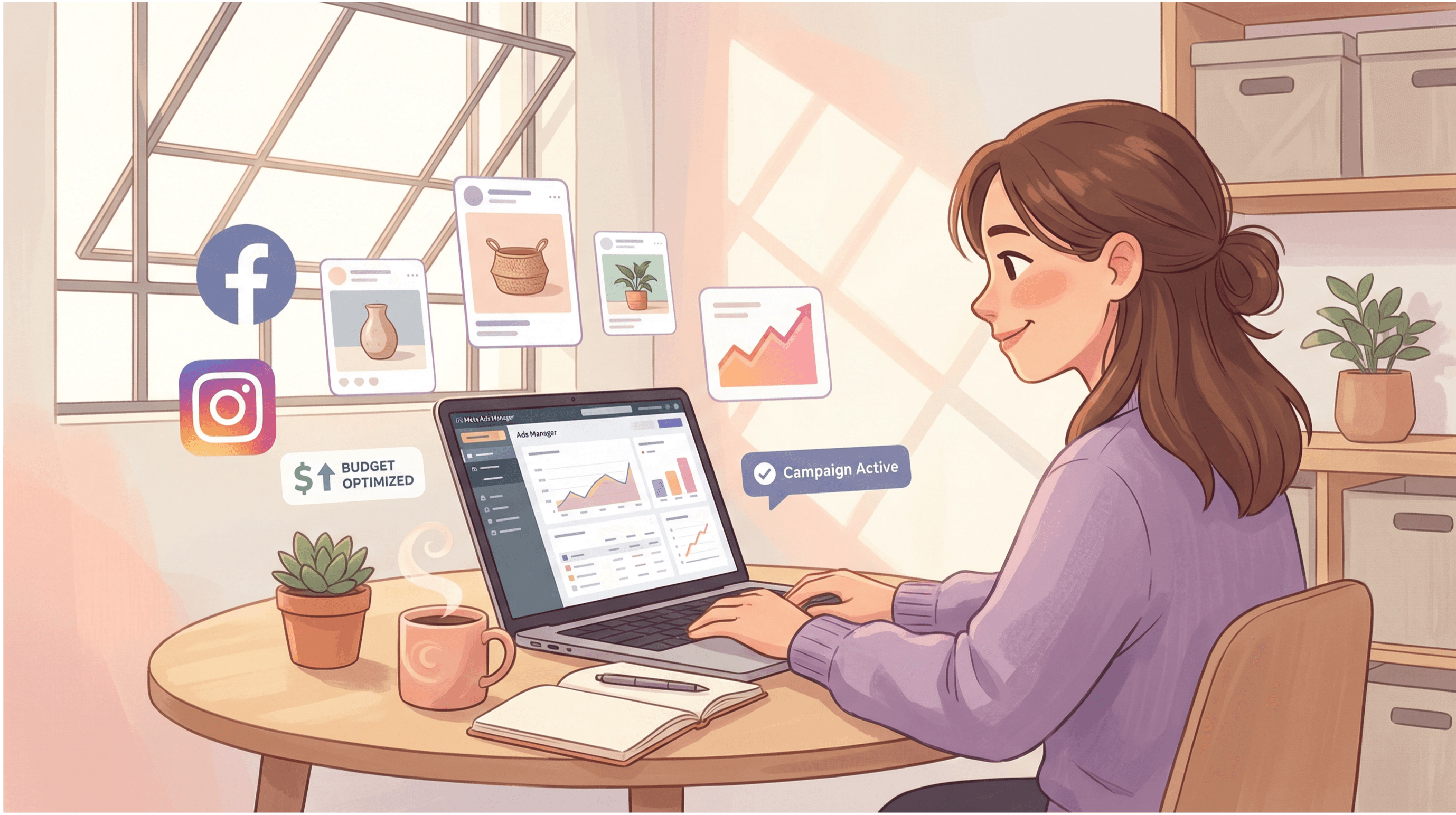
An illustration of a specialist in a modern office setting next to a computer monitor displaying an analytics dashboard. Floating digital bubbles highlight „60 MIN SETUP“ and „GDPR-COMPLIANT,“ representing a fast and legally compliant Meta Pixel installation for UK small businesses.

Advertise on Facebook on a Small Budget: The 7-Day Playbook

17 Dec 2025

Dec 13, 2025

8

Dec 13, 2025

An illustration of a specialist in a modern office setting next to a computer monitor displaying an analytics dashboard. Floating digital bubbles highlight „60 MIN SETUP“ and „GDPR-COMPLIANT,“ representing a fast and legally compliant Meta Pixel installation for UK small businesses.

By the end of this article, you’ll know exactly how to:

  • Set up your first simple campaign aimed at real people in your local area

  • Avoid the most common “budget-drain” mistakes small businesses make

  • Launch your first Facebook ad in under 7 days, even if you’ve never opened Ads Manager before

You’re running a small business, wearing ten hats, and wondering if Facebook ads are really worth the hassle in 2026. Another platform to learn, another thing to spend money on, and absolutely no time to spare. Totally fair question.

Here’s the short answer: yes, Facebook ads are still worth your attention as a UK small business owner, especially if you rely on local customers.

This guide is written for your real situation: a small budget, little time and no desire to become a full-time marketer. We’ll walk you through Facebook ads for UK small businesses step by step, in plain language.

Why Facebook Ads Still Work for UK Small Businesses

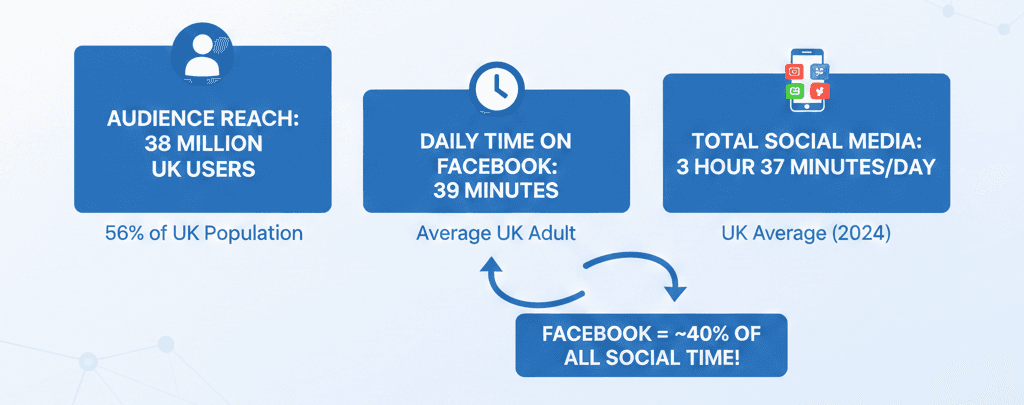
Even though everyone talks about TikTok and new channels, Facebook is still one of the best ways to reach people in your area. Meta’s own ad tools estimate around 38 million people in the UK use Facebook, which is over half of the entire population!

On top of that, UK adults are spending around 39 minutes per day on Facebook on average, and about 1 hour 37 minutes per day on social media overall. That’s a lot of potential customers scrolling on their phones, on the sofa, on the train or in the queue at Tesco. In those moments, a simple, well-targeted Facebook ad for a local café, salon, gym, tradesperson or online shop can easily catch their eye.
You might be thinking:

  • “I don’t have a big budget.”

  • “I don’t have time to mess around in Ads Manager.”

  • “I’m not a marketing expert – what if I waste my money?”

Don’t worry. You don’t need a massive ad spend or an agency on retainer. You just need a clear, focused setup that works for a small business like yours. That’s exactly what we’re going to do next.

What You Need Before You Start

Before we touch a single button in the Facebook Ads Manager, let’s make sure you’ve got the basics in place. The good news? You don’t need much, just a few essentials and about an hour.

Setting Up Your Facebook Business Page & Ads Manager

If you already have a private Facebook account, you’re about 70% ready.

All we’re doing now is checking a few essentials and making sure you have everything in place to get started with Ads Manager.

Quick checklist (tick these off mentally):

You might also be wondering about Facebook ads price and the cost for Instagram ads. The good news: you don’t need a huge budget to get started. With a small daily budget (around £5 per day), you can test your first simple Facebook ad or Instagram advertisement without taking a big financial risk.

  • A personal Facebook account you use to manage your business

  • A valid credit card ready for your ad payments (by far the simplest and most reliable option on Facebook)

  • A clear goal for your first campaign (e.g. send people to your website or WhatsApp)

  • 1-3 good photos or a short video you can use as your ads

If you’re missing one of these, don’t panic. You can set most of them up in a few minutes.

3 Steps to Completely Set Up Your Facebook Ads Account

Before we start, one important note: you’ll use your personal Facebook account to set up your business assets. Facebook treats you, via your private profile, as the person representing your company.

Step 1: Create Your Ads Manager

  1. Go to Ads Manager: [click here]

  2. Create your business profile by clicking the blue button and following Meta’s registration process.

  3. If you already have a Business Manager on Meta, you can skip steps 1 and 2.

For running ads, the Facebook Ads Manager is the main tool you need, it’s Meta’s official ad manager for Facebook and Instagram. When people talk about the Facebook advertising manager, this is exactly what they mean.

Meta also offers Business Suite for messages, posts and more, but to get started with ads, you can safely ignore Business Suite for now.

Step 2: Set Up Your Business Profile for Ads

Secondly, you need a Facebook Page to represent your business.

  1. In Ads Manager, go to Settings (⚙️) in the left sidebar.

  2. Look for the “Pages” tab.

  3. Click the blue button to create your Facebook Business Page.

  4. Follow Facebook’s setup process (name, category, contact details, logo/cover).

Congratulations – there’s only one step left before you can start advertising.

Step 3: Create Your Ad Account

Thirdly, you need an ad account where you pay for and manage all your Facebook ads.

  1. Just like in Step 2, go to Settings (⚙️) in the left sidebar.

  2. Look for the “Ad accounts” tab.

  3. Click the blue button to create your Facebook ad account.

  4. Fill out the relevant information, such as time zone and currency (make sure these are correct – they’re hard to change later).

  5. Once it’s created, click the arrow next to “Open in Ads Manager” and add your payment method (your credit card).

Congratulations – you’re now fully set up and ready to run Facebook ads. In the next step, we’ll build your first simple campaign.

Start Your First Ads

Now that everything is set up, it’s time to actually get your first ad live. Don’t worry, you don’t need a perfect design or a big campaign plan. You just need three simple things:

  1. A destination to send people to

  2. Simple but clear ad creatives (image/video)

  3. A basic campaign setup or let Adlarion do the heavy lifting for you, for free!

1. Choose Your Destination

Before you create anything, decide where you want people to go when they click your ad. Facebook calls this your destination URL.

Common destinations for UK small businesses:

  • Your website: e.g. homepage, product page, service page, pricing page, contact page

  • An online booking page: for salons, gyms, clinics, coaches, trades

  • A contact or enquiry form: to capture leads for quotes or consultations

  • WhatsApp or phone: for quick questions, bookings, or telephone enquiries

  • Instagram profile or post: if you want to grow your reach and send people to a specific Instagram advertisement or content you want to promote

If you’re not sure which one to choose, keep it simple:

If you want sales or bookings → send people to your website or booking page.
If you want conversations → send them to WhatsApp or phone.

Not sure which destination is right for you? Check out our guide on choosing the best Facebook ad destination for your business.

2. Gather Your Ad Creatives

Next, you need something for people to actually see and read, your designs. You don’t need professional designs. For most small businesses, these work really well:

Good options for images or video:

  • A clear photo of your shop front or team

  • A photo of your best-selling product

  • A simple before/after (e.g. hair, renovations, cleaning, landscaping)

  • A short phone video (10–20 seconds) showing your service in action

  • A picture of a happy customer (with their permission)

Simple text formula you can place on your Ads:

  • Headline: Call out your audience or problem you solve

  • Benefit: What they get from you

  • Call to action: What they should do next, e.g. “Contact us” or “Book now”

Example for a local salon:

Headline: Bad hair day in [Your Town]?

Benefit: Book a cut & blow dry at [Salon Name] and walk out feeling fresh again.

Call to Action: Book now →

You can adapt this structure to almost any local business.

3. Launch Your First Campaign

Let’s walk through a simple campaign in the Facebook Ads Manager and keep it simple. There are only three areas you need to know:

Campaigns: where you set your main goal (traffic, leads, messages, etc.).

Ad Sets: where you choose your audience, budget and placements.

Ads: where you create what people actually see: your images, videos and text.

Create a new campaign

  1. In the left sidebar, click the Settings (⚙️) icon, then select “Ads Manager” to open it.

  2. Click the green “Create” button.

  3. Choose 1 of these 3 objectives, ignore the rest:

    • Awareness: if you want more people to discover and remember your business

    • Leads: if you offer a service like coaching, plumbing, accounting, beauty treatments

    • Sales: if you want to sell products directly online

  4. Give your campaign a clear name

  5. Set the budget to “Ad set budget”r

You can leave the remaining options as default for now and click on next.

Set up your Ad Set (who sees your ad + budget)

In the Ad Set level:

  1. Conversion location: Choose where you want people to go (website, messages, etc.).

  2. Data set: If nothing shows here, check our guide for a quick fix.

  3. Budget & schedule: We recommend starting with at least £5 per day and leaving the schedule as it is.

  4. Audience – location: Choose where you want your ads to show. You can target the whole UK or just your local area, for example your town and a small surrounding radius.

  5. Beneficiary: Enter your business name.

Leave placements on Automatic for now, Meta will show your ads where they’re most likely to perform.

Finally: Create your Ad

Now switch to the Ad level by clicking Next again:

  1. Choose the Facebook Page (and Instagram account, if you have one) you want to run the ad from.

  2. Enter your destination URL, either your website/booking page URL or select WhatsApp/Messenger.

  3. Pick your format (“Single image or video”).

  4. Set up creative and upload your image or video.

  5. Add your Primary text using the winning formula from above.

  6. Add your “Call to Action” as your headline, for example: “Get a Free Quote Today”

Give everything a quick check: spelling, links working, image looks good. Then click Publish.

That’s it, your first Facebook ad is live. Congratulations! 🎉

Secret shortcut: Do it in 5 minutes with Adlarion

If launching a campaign still feels like a lot on top of running your business, you can do it in only 5 minutes with Adlarion. Instead of manually building campaigns, you can:

  1. Connect your Facebook Page and ad account to Adlarion

  2. Choose your goal and upload your images and videos

  3. Let Adlarion create the text, professional ads and a full campaign with a few simple clicks

Behind the scenes, Adlarion:

  • Creates best-practice campaigns tailored for small local businesses

  • Writes ad texts and professional designs for you

  • Optimises your ads automatically and translates all results into simple, easy-to-understand language

You run everything directly from Adlarion, you just skip the technical setup work, save time and run your marketing more efficiently. Try it out for free.

By the end of this article, you’ll know exactly how to:

  • Set up your first simple campaign aimed at real people in your local area

  • Avoid the most common “budget-drain” mistakes small businesses make

  • Launch your first Facebook ad in under 7 days, even if you’ve never opened Ads Manager before

You’re running a small business, wearing ten hats, and wondering if Facebook ads are really worth the hassle in 2026. Another platform to learn, another thing to spend money on, and absolutely no time to spare. Totally fair question.

Here’s the short answer: yes, Facebook ads are still worth your attention as a UK small business owner, especially if you rely on local customers.

This guide is written for your real situation: a small budget, little time and no desire to become a full-time marketer. We’ll walk you through Facebook ads for UK small businesses step by step, in plain language.

Why Facebook Ads Still Work for UK Small Businesses

Even though everyone talks about TikTok and new channels, Facebook is still one of the best ways to reach people in your area. Meta’s own ad tools estimate around 38 million people in the UK use Facebook, which is over half of the entire population!

On top of that, UK adults are spending around 39 minutes per day on Facebook on average, and about 1 hour 37 minutes per day on social media overall. That’s a lot of potential customers scrolling on their phones, on the sofa, on the train or in the queue at Tesco. In those moments, a simple, well-targeted Facebook ad for a local café, salon, gym, tradesperson or online shop can easily catch their eye.

You might be thinking:

  • “I don’t have a big budget.”

  • “I don’t have time to mess around in Ads Manager.”

  • “I’m not a marketing expert – what if I waste my money?”

Don’t worry. You don’t need a massive ad spend or an agency on retainer. You just need a clear, focused setup that works for a small business like yours. That’s exactly what we’re going to do next.

What You Need Before You Start

Before we touch a single button in the Facebook Ads Manager, let’s make sure you’ve got the basics in place. The good news? You don’t need much, just a few essentials and about an hour.

Setting Up Your Facebook Business Page & Ads Manager

If you already have a private Facebook account, you’re about 70% ready.

All we’re doing now is checking a few essentials and making sure you have everything in place to get started with Ads Manager.

Quick checklist (tick these off mentally):

You might also be wondering about Facebook ads price and the cost for Instagram ads. The good news: you don’t need a huge budget to get started. With a small daily budget (around £5 per day), you can test your first simple Facebook ad or Instagram advertisement without taking a big financial risk.

  • A personal Facebook account you use to manage your business

  • A valid credit card ready for your ad payments (by far the simplest and most reliable option on Facebook)

  • A clear goal for your first campaign (e.g. send people to your website or WhatsApp)

  • 1-3 good photos or a short video you can use as your ads

If you’re missing one of these, don’t panic. You can set most of them up in a few minutes.

3 Steps to Completely Set Up Your Facebook Ads Account

Before we start, one important note: you’ll use your personal Facebook account to set up your business assets. Facebook treats you, via your private profile, as the person representing your company.

Step 1: Create Your Ads Manager

  1. Go to Ads Manager: [click here]

  2. Create your business profile by clicking the blue button and following Meta’s registration process.

  3. If you already have a Business Manager on Meta, you can skip steps 1 and 2.

For running ads, the Facebook Ads Manager is the main tool you need, it’s Meta’s official ad manager for Facebook and Instagram. When people talk about the Facebook advertising manager, this is exactly what they mean.

Meta also offers Business Suite for messages, posts and more, but to get started with ads, you can safely ignore Business Suite for now.

Step 2: Set Up Your Business Profile for Ads

Secondly, you need a Facebook Page to represent your business.

  1. In Ads Manager, go to Settings (⚙️) in the left sidebar.

  2. Look for the “Pages” tab.

  3. Click the blue button to create your Facebook Business Page.

  4. Follow Facebook’s setup process (name, category, contact details, logo/cover).

Congratulations – there’s only one step left before you can start advertising.

Step 3: Create Your Ad Account

Thirdly, you need an ad account where you pay for and manage all your Facebook ads.

  1. Just like in Step 2, go to Settings (⚙️) in the left sidebar.

  2. Look for the “Ad accounts” tab.

  3. Click the blue button to create your Facebook ad account.

  4. Fill out the relevant information, such as time zone and currency (make sure these are correct – they’re hard to change later).

  5. Once it’s created, click the arrow next to “Open in Ads Manager” and add your payment method (your credit card).

Congratulations – you’re now fully set up and ready to run Facebook ads. In the next step, we’ll build your first simple campaign.

Start Your First Ads

Now that everything is set up, it’s time to actually get your first ad live. Don’t worry, you don’t need a perfect design or a big campaign plan. You just need three simple things:

  1. A destination to send people to

  2. Simple but clear ad creatives (image/video)

  3. A basic campaign setup or let Adlarion do the heavy lifting for you, for free!

1. Choose Your Destination

Before you create anything, decide where you want people to go when they click your ad. Facebook calls this your destination URL.

Common destinations for UK small businesses:

  • Your website: e.g. homepage, product page, service page, pricing page, contact page

  • An online booking page: for salons, gyms, clinics, coaches, trades

  • A contact or enquiry form: to capture leads for quotes or consultations

  • WhatsApp or phone: for quick questions, bookings, or telephone enquiries

  • Instagram profile or post: if you want to grow your reach and send people to a specific Instagram advertisement or content you want to promote

If you’re not sure which one to choose, keep it simple:

If you want sales or bookings → send people to your website or booking page.
If you want conversations → send them to WhatsApp or phone.

Not sure which destination is right for you? Check out our guide on choosing the best Facebook ad destination for your business.

2. Gather Your Ad Creatives

Next, you need something for people to actually see and read, your designs. You don’t need professional designs. For most small businesses, these work really well:

Good options for images or video:

  • A clear photo of your shop front or team

  • A photo of your best-selling product

  • A simple before/after (e.g. hair, renovations, cleaning, landscaping)

  • A short phone video (10–20 seconds) showing your service in action

  • A picture of a happy customer (with their permission)

Simple text formula you can place on your Ads:

  • Headline: Call out your audience or problem you solve

  • Benefit: What they get from you

  • Call to action: What they should do next, e.g. “Contact us” or “Book now”

Example for a local salon:

Headline: Bad hair day in [Your Town]?

Benefit: Book a cut & blow dry at [Salon Name] and walk out feeling fresh again.

Call to Action: Book now →

You can adapt this structure to almost any local business.

3. Launch Your First Campaign

Let’s walk through a simple campaign in the Facebook Ads Manager and keep it simple. There are only three areas you need to know:

Campaigns: where you set your main goal (traffic, leads, messages, etc.).

Ad Sets: where you choose your audience, budget and placements.

Ads: where you create what people actually see: your images, videos and text.

Create a new campaign

  1. In the left sidebar, click the Settings (⚙️) icon, then select “Ads Manager” to open it.

  2. Click the green “Create” button.

  3. Choose 1 of these 3 objectives, ignore the rest:

    • Awareness: if you want more people to discover and remember your business

    • Leads: if you offer a service like coaching, plumbing, accounting, beauty treatments

    • Sales: if you want to sell products directly online

  4. Give your campaign a clear name

  5. Set the budget to “Ad set budget”r

You can leave the remaining options as default for now and click on next.

Set up your Ad Set (who sees your ad + budget)

In the Ad Set level:

  1. Conversion location: Choose where you want people to go (website, messages, etc.).

  2. Data set: If nothing shows here, check our guide for a quick fix.

  3. Budget & schedule: We recommend starting with at least £5 per day and leaving the schedule as it is.

  4. Audience – location: Choose where you want your ads to show. You can target the whole UK or just your local area, for example your town and a small surrounding radius.

  5. Beneficiary: Enter your business name.

Leave placements on Automatic for now, Meta will show your ads where they’re most likely to perform.

Finally: Create your Ad

Now switch to the Ad level by clicking Next again:

  1. Choose the Facebook Page (and Instagram account, if you have one) you want to run the ad from.

  2. Enter your destination URL, either your website/booking page URL or select WhatsApp/Messenger.

  3. Pick your format (“Single image or video”).

  4. Set up creative and upload your image or video.

  5. Add your Primary text using the winning formula from above.

  6. Add your “Call to Action” as your headline, for example: “Get a Free Quote Today”

Give everything a quick check: spelling, links working, image looks good. Then click Publish.

That’s it, your first Facebook ad is live. Congratulations! 🎉

Secret shortcut: Do it in 5 minutes with Adlarion

If launching a campaign still feels like a lot on top of running your business, you can do it in only 5 minutes with Adlarion. Instead of manually building campaigns, you can:

  1. Connect your Facebook Page and ad account to Adlarion

  2. Choose your goal and upload your images and videos

  3. Let Adlarion create the text, professional ads and a full campaign with a few simple clicks

Behind the scenes, Adlarion:

  • Creates best-practice campaigns tailored for small local businesses

  • Writes ad texts and professional designs for you

  • Optimises your ads automatically and translates all results into simple, easy-to-understand language

You run everything directly from Adlarion, you just skip the technical setup work, save time and run your marketing more efficiently. Try it out for free.

The future of small business growth

Let your business grow, automatically.

Adlarion handles your marketing so you can focus on what really matters.
No setup. No contracts. Cancel anytime.

Grow without barriers!

Focus on what really matters.

No setup. No contracts. Cancel anytime.

The future of small business growth

Let your business grow, automatically.

Adlarion handles your marketing so you can focus on what really matters.
No setup. No contracts. Cancel anytime.

Advertise on Facebook on a Small Budget: The 7-Day Playbook

17 Dec 2025

8

min read

An illustration of a specialist in a modern office setting next to a computer monitor displaying an analytics dashboard. Floating digital bubbles highlight „60 MIN SETUP“ and „GDPR-COMPLIANT,“ representing a fast and legally compliant Meta Pixel installation for UK small businesses.

Advertise on Facebook on a Small Budget: The 7-Day Playbook

17 Dec 2025

8

min read

An illustration of a specialist in a modern office setting next to a computer monitor displaying an analytics dashboard. Floating digital bubbles highlight „60 MIN SETUP“ and „GDPR-COMPLIANT,“ representing a fast and legally compliant Meta Pixel installation for UK small businesses.